


GPS Maps Voice Navigation
4.1236.00 Reviews
App Specs
- Version
- 6.3.4
- Updated On
- License
- Free
- Downloads
- 1,000,000+
- Developer
- MINDBYTE STUDIOS
- Categories
- Travel & Local
- Platform
- Android
Screenshots
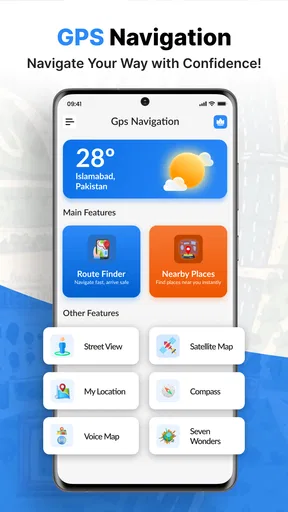
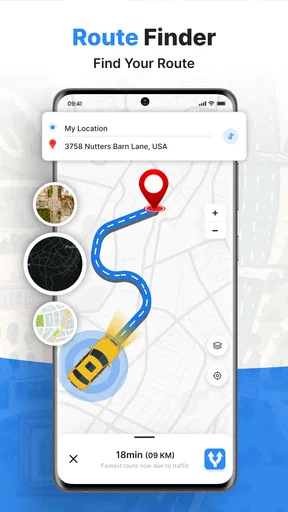
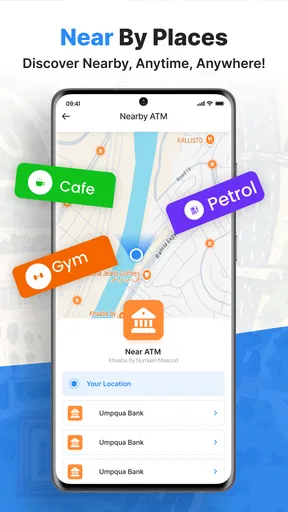
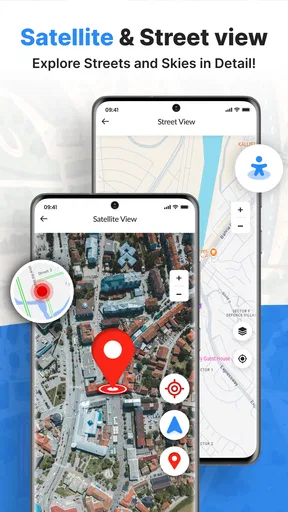
 Analysis by AppCompare
When I choose a navigation app, I care less about how many features it claims to have and more about whether I can set a destination quickly, follow directions without staring at the screen, and recover calmly if a plan changes. GPS Maps Voice Navigation is aimed at that everyday need: it is a travel and local app from Green Lines, built around GPS maps and spoken guidance. I’d consider it when I want a straightforward route companion, while keeping in mind that the best choice depends on how much I rely on live road information, offline access, and detailed planning.
A practical fit for ordinary journeys
The clearest reason to try this app is its focus on getting from one place to another with voice directions. That can be useful on a familiar commute, but it matters even more when I’m driving somewhere new and would rather listen for the next turn than repeatedly check a display. The app is free to install and is rated for Everyone, so it is easy to try without making a purchase decision first.
A realistic use case is an errand run across an unfamiliar part of town: I can plan the destination before setting off, keep the phone where it is visible without handling it, and listen for directions while paying attention to the road. If I need to make several stops, the route-planning approach described for the app may suit a sequence of errands better than entering each destination as a separate trip. I’d still review the order before leaving; a route with multiple stops is only helpful if it matches the way I actually want to travel.
What to check before relying on it
Navigation can feel dependable on one trip and less convenient on another, because signal conditions, changing roads, and the way a driver interprets instructions all matter. I recommend setting a destination while parked, checking that the route looks sensible, and listening to the first few prompts before moving off. This small habit gives me a chance to notice an unexpected route early, rather than trying to troubleshoot while driving.
Offline maps are especially relevant for rural journeys, trips through areas with weak mobile service, or travel where I want to reduce dependence on a connection. The useful trade-off is preparation: I’d download the area I need before leaving and make sure it covers the route, rather than assuming offline access will solve every navigation problem automatically. I would also keep a backup plan for remote travel, since a map app cannot remove the practical limits of a phone’s battery, GPS reception, or changing road conditions.
The app has a 4.8 average from around 1.4 thousand ratings, and it has passed one million installs. Those figures suggest that many people have tried it, but they don’t tell me whether its routing style will suit my own habits. Its current version is 6.1.6, and it runs on Android 8.0 or newer. Those details are useful when checking an older device, especially before making it the only navigation option for a trip.
Getting Started with Your New Travel Buddy
So, what's the deal with GPS Maps Voice Navigation? At first glance, it seems like just another navigation app, but after taking it for a spin, I can assure you, it's much more. Installing the app is a breeze, and once you're in, the interface feels like home. It’s intuitive, straightforward, and gets you where you need to go without any fuss.
Worth Reading Before You Choose

EA SPORTS FC Mobile 26 Is a Bigger Football Game, but It Takes Time

Flipboard Shows What News Apps Must Do Beyond the Feed

Switching to Android Auto Means Rethinking Your Driving Routine

Google Calendar Makes a Crowded Week Easier to Manage

Ludo King Makes the Most of the Minutes Between Plans

Baby Panda World Brings Quick Play to Modern Phones, but Its Game Library Feels Busy
Upon launching the app, you're greeted with a clean map that’s easy on the eyes and packed with information. The app covers a wide range of areas and is constantly updated, which means you won't miss out on new roads or changes in traffic conditions.
All About the Features
Let's dive into the features. First off, the voice navigation is a lifesaver. It’s like having a friendly guide right there with you, providing turn-by-turn directions. The voice is clear and the instructions are timely. No more looking at your phone when you should be watching the road!
One of the standout features is the real-time traffic alerts. Whether there's a traffic jam, an accident, or roadwork up ahead, you’ll know about it in advance. The app automatically suggests alternative routes, saving you precious time and avoiding stress.
Planning a trip? The app's route planner is your best friend. You can plot multiple stops along your journey, ensuring you hit all your favorite spots. Plus, it calculates the fastest or most scenic routes depending on your preference. It’s like having a personal travel assistant right in your pocket.
How it fits beside other map apps
When I compare this kind of GPS tool with a phone’s built-in maps app, the deciding point is usually not the map itself but the workflow I prefer. Some people want one familiar app for directions, saved places, and everyday searches; others would rather use a dedicated navigation tool when driving. This app’s appeal is its voice-led, route-focused approach, while someone who depends on a particular ecosystem of saved locations or other map services may find their usual option more convenient.
It also helps to distinguish driving guidance from broader trip research. A navigation app can take me along a route, but I may still prefer a separate local-search or travel-planning tool when comparing places to visit or organizing a day out. The app’s description of integrations with services such as Yelp and TripAdvisor suggests a discovery angle, but I would not choose it solely as a replacement for every travel service I use. I’d test whether the places and information I personally need are easy to find before building a whole itinerary around it.
For a short, familiar drive, switching apps may not improve much. For a longer route with several stops, though, a dedicated planner can be more convenient if its stop sequence matches the trip. My practical tip is to enter the important stops before departure and check that the resulting route follows the intended order. If the journey changes mid-drive, pull over before making edits; convenience is never worth dividing attention on the road.
Why You'll Love It
Now, let’s talk about why this app is a game-changer. It’s not just the features, but how seamlessly they work together. The integration with various services like Yelp and TripAdvisor means you’re not just getting from A to B; you’re discovering new places along the way.
Have you ever found yourself in the middle of nowhere with no signal? No problem! The offline maps feature ensures you’re never truly lost, even when your mobile connection is. Just download the maps of the areas you'll be traveling through, and you're good to go.
Cost, upgrades, and the effort of switching
There is no upfront price to try the app, although it offers in-app purchases ranging from $0.99 to $119.99 per item. That is a wide range, so I would check what a purchase actually unlocks and whether I need it before paying. If basic directions meet my needs, I can start without spending anything; if I’m considering a paid item, I’d weigh it against the navigation tools I already use rather than assuming an upgrade is essential.
Switching from another map app has a small but real cost: learning where to enter destinations, understanding how route changes are presented, and rebuilding any habits around saved locations. I’d avoid changing navigation tools on the morning of an important trip. A low-stakes local drive is a better test, because I can compare the route and instruction style with what I know without risking a stressful first use far from home.
One useful test is to try the same ordinary destination on both this app and the map tool I already rely on, while parked. I can compare whether each route makes sense to me, how clear the spoken cues feel, and whether the map is readable at a glance. That does not prove which one will always be faster, but it tells me which interface I can follow more comfortably. For a driver who values simple voice guidance, comfort and clarity may matter more than a long feature list.
Some Personal Thoughts
I've been using GPS Maps Voice Navigation for a while now, and it’s become a staple on my phone. Whether I’m commuting to work, going on a road trip, or just exploring new neighborhoods, it’s my go-to app. The accuracy and reliability have not let me down, and the user-friendly design makes it a pleasure to use.
Honestly, the app has made my travels smoother and more enjoyable. It’s like having a trusty sidekick who’s got your back, no matter where your journey takes you.
Who should choose it—and who should look elsewhere
I’d recommend giving it a try if you want spoken turn-by-turn help, prefer having a map ready for local drives, or expect to plan a journey with multiple stops. It may also be a sensible option for someone who wants to explore a different navigation workflow without paying to install it. Since it is rated for Everyone, it is broadly suitable from a content-rating perspective, though children should still use navigation with an adult’s supervision and never handle a phone while a vehicle is moving.
I would be more cautious if I need a navigation tool to meet a specific requirement that I have not tested, or if my trips regularly depend on detailed local information and a tightly integrated collection of saved places. In that situation, I’d compare the app with the services I already use before switching. The same goes for someone who expects offline maps to remove every connectivity concern: preparation helps, but I would not treat an offline map as a guarantee of uninterrupted guidance in every circumstance.
Before a longer trip, I’d make a short checklist: confirm the destination and stop order, prepare the offline map for areas where service may be weak, set up voice guidance while parked, and charge the phone. Those are simple steps, but they prevent common sources of frustration that have little to do with the route itself. I’d also keep my attention on the road and follow local traffic rules rather than treating any app’s suggestion as an instruction that overrides safe driving.
Wrapping Up
In conclusion, if you're looking for a reliable, feature-rich navigation app, give GPS Maps Voice Navigation a try. It’s smart, efficient, and will keep you on track every step of the way. So, go ahead, download it, and set off on your next adventure with confidence.
My recommendation is measured rather than universal: it is worth testing if voice directions, route planning, and offline preparation match the way you travel. The app was released on February 17, 2025, and Green Lines continues to offer it as a free download, with optional in-app purchases. I’d try it on a routine trip first, then decide whether its directions and planning suit me well enough to become part of my regular setup. If my existing maps already handle my routes comfortably, there may be little reason to switch; if I want a different voice-guided option, this is an approachable one to evaluate.
Pros
- Clear voice directions enhance safety.
- Real-time traffic updates save time.
- Offline maps available for remote areas.
- User-friendly interface for easy navigation.
- Customizable route options for preferences.
Cons
- High battery consumption during use.
- Occasional GPS signal loss in dense areas.
- In-app ads can be distracting.
- Limited features in free version.
- Data-heavy
- may incur extra charges.
FAQs for GPS Maps Voice Navigation
What are the main features of GPS Maps Voice Navigation?
GPS Maps Voice Navigation offers real-time turn-by-turn directions, voice-guided navigation, traffic updates, and offline maps. It supports a variety of map views, including satellite and terrain. The app also provides points of interest, route planning, and location sharing, making it comprehensive for both casual and frequent travelers.
Does GPS Maps Voice Navigation work offline?
Yes, GPS Maps Voice Navigation offers offline functionality. Users can download maps for specific regions to access navigation without an internet connection. This feature is especially useful for travelers in areas with limited or no mobile data coverage, ensuring uninterrupted navigation.
How accurate is the real-time traffic feature?
The real-time traffic feature in GPS Maps Voice Navigation is generally accurate, providing updates on traffic congestion, road closures, and accidents. It utilizes data from multiple sources to offer the best possible route alternatives, helping users avoid delays and reach their destinations efficiently.
Is GPS Maps Voice Navigation compatible with all devices?
GPS Maps Voice Navigation is available for both Android and iOS platforms. It is compatible with most devices running on recent operating systems. However, performance may vary depending on the device's hardware specifications, so it's recommended to use it on newer models for optimal performance.
Are there any subscription fees or in-app purchases?
GPS Maps Voice Navigation is free to download and use, but it offers premium features through in-app purchases. These may include ad removal, access to additional map features, or enhanced navigation options. Users can choose to subscribe for these extras depending on their needs and preferences.


